


Delegated RPKI
What is Delegated RPKI?
Delegated Resource Public Key Infrastructure (RPKI) is an infrastructure in which a Regional Internet Registry’s direct resource holders may request their own delegated resource certificates and host their own Certificate Authority (CA). Using their CA, Delegated RPKI participants may then sign Route Origin Authorizations (ROAs) and issue resource certificates for their customers. This hierarchy of resource certificates is validated from the top down, beginning with the nominated Trust Anchor. ARIN is the nominated Trust Anchor for RPKI in its region.
ARIN’s RPKI repository holds a certificate for each organization participating in its Delegated RPKI service. In turn, each Delegated RPKI participant’s repository holds a resource certificate for any downstream organization participating in Delegated RPKI through them. By following this chain, any resource certificate may be located and validated.
All organizations running Delegated RPKI are responsible for maintaining their own CA. Hosting the CA allows an organization to offer either Hosted or Delegated RPKI to their downstream customers and assume the responsibility for the cryptographic verification of their customers’ certificate requests and ROAs. ARIN’s Delegated RPKI service uses the Up/Down RPKI protocol and supports RFC 8183 for setup of Delegated RPKI. In this out-of-band setup, organizations provide ARIN with their child request XML file when setting up the identity exchange in Delegated RPKI.
Additionally, organizations running Delegated RPKI are responsible for ensuring their resource certificates and ROAs are available to other entities. To make your RPKI object repository available to the public, you will need to publish it on a publication server. Publication of repositories can be done in-house or by using ARIN’s Repository Publication Service.
NOTE: ARIN’s RPKI repository supports RPKI Repository Delta Protocol. See RFC 8182 for more information.
Some CA packages, such as Krill, facilitate running your own publication server. Krill is a free, open-source RPKI daemon written by NLnet Labs that features a CA and publication server and is recommended for organizations that want to use the ARIN Repository Publication Service for Delegated RPKI.
Prerequisites for Delegated RPKI
Before signing up, you must have:
- IPv4 or IPv6 resources obtained directly from ARIN and covered by an ARIN Agreement
- An ARIN Online account linked to an Admin, Tech, or Routing Point of Contact with authority to manage those resources
- An Up/Down identity (created with software that supports Delegated RPKI; additional information is given below)
- A software/hardware infrastructure in which to host a CA
- A software/hardware infrastructure in which to host a highly available publication server OR intent to use the ARIN Repository Publication Service
Configuring Delegated RPKI
Before configuring Delegated RPKI, you must obtain software that supports Delegated RPKI, such as Krill or Dragon Research Lab’s RPKI Toolkit.
- Log in to ARIN Online and select Routing Security, then RPKI from the navigation menu.
- In the ‘Manage RPKI’ page, under ‘Your Organizations,’ select Sign up for RPKI for the organization for which you want to configure Delegated RPKI.
- In the ‘Manage RPKI’ page, under ‘Choose Between Two Models of RPKI,’ select Sign up for Delegated to make your resource certificate request.
- ARIN will create a resource certificate that covers the resources allocated to your organization.
- Keep this browser window/tab open and continue the next steps in a new window/tab and come back to this window to complete the process.
It is optional, but recommended, that you first go through all the configuration steps using your ARIN Online account in the Operational Test & Evaluation environment.
The following instructions were developed using Krill v0.9.2.
Install Delegated RPKI Software and Create the Certificate Authority
- Install Krill following the instructions on the Krill website.
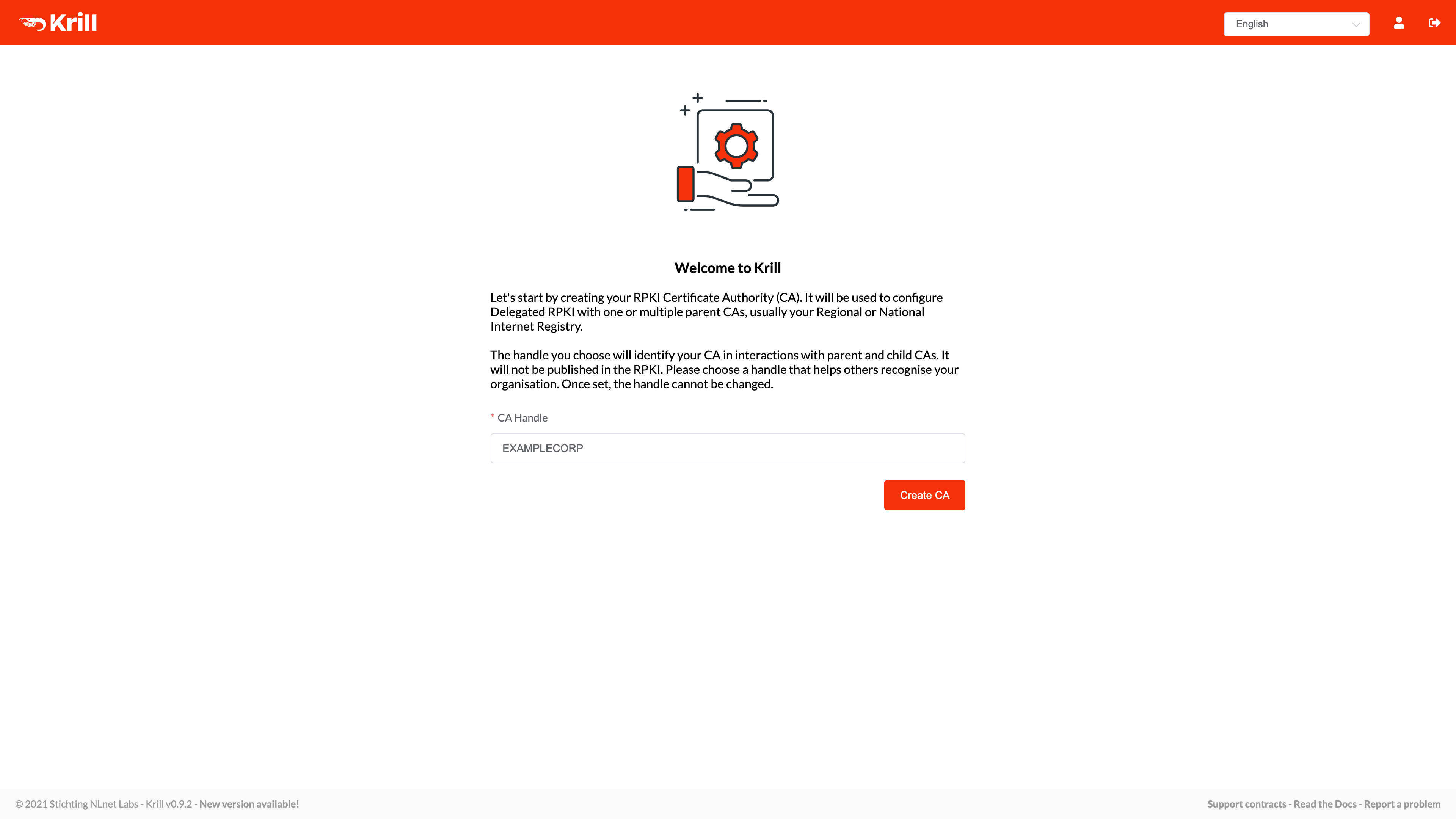
- Create your Certificate Authority (CA): Set the CA Handle for your organization. Your ARIN Org ID – the unique identifier in ARIN’s database for your organization, also known as Org Handle – is recommended for use as the CA Handle. Choose Create CA.
Connect your Certificate Authority to ARIN with the Child Request XML
- Open the Krill software.
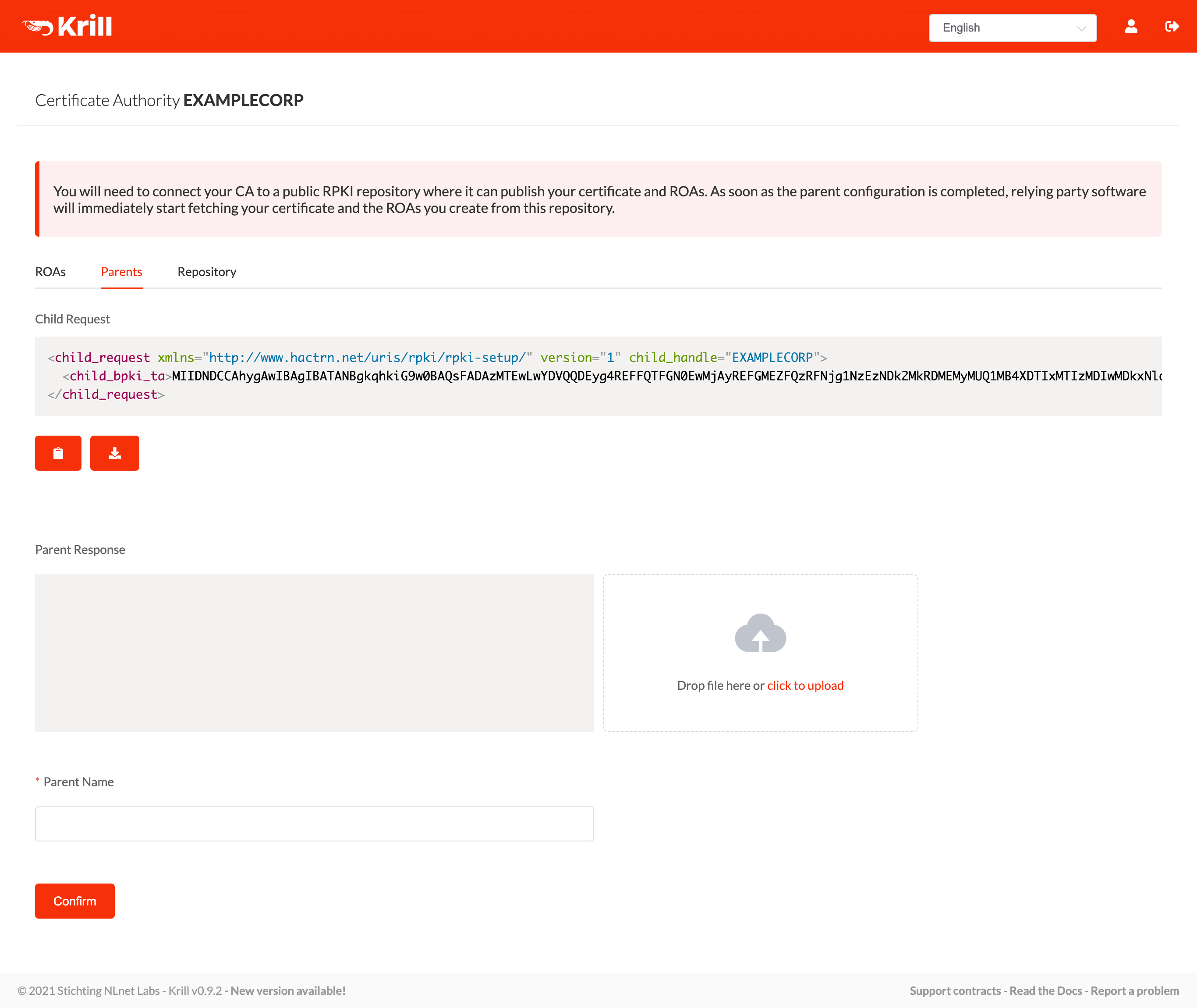
- Choose the Parents tab to get the generated Child Request XML containing your up/down identity information. (The Child Request XML obsoletes the identity.xml file, but references may still exist to the identity.xml file in ARIN software and documentation.) The Child Request XML file contains the Base CA Repository URI that matches the location of your RPKI repository, which allows ARIN to reference it.
- Copy the Child Request XML. You will need to paste this XML in ARIN Online.
Provide the Child Request XML to ARIN
After you’ve generated and copied your Child Request XML:
- In the appropriate browser window/tab, ensure you’re still logged into ARIN Online and on the same “Request Enrollment in Delegated RPKI” screen as you were at the beginning.
- Paste the Child Request XML you previously copied and choose Submit. (This obsoletes the identity.xml file, but references may still exist to the identity.xml file in ARIN software and documentation.)
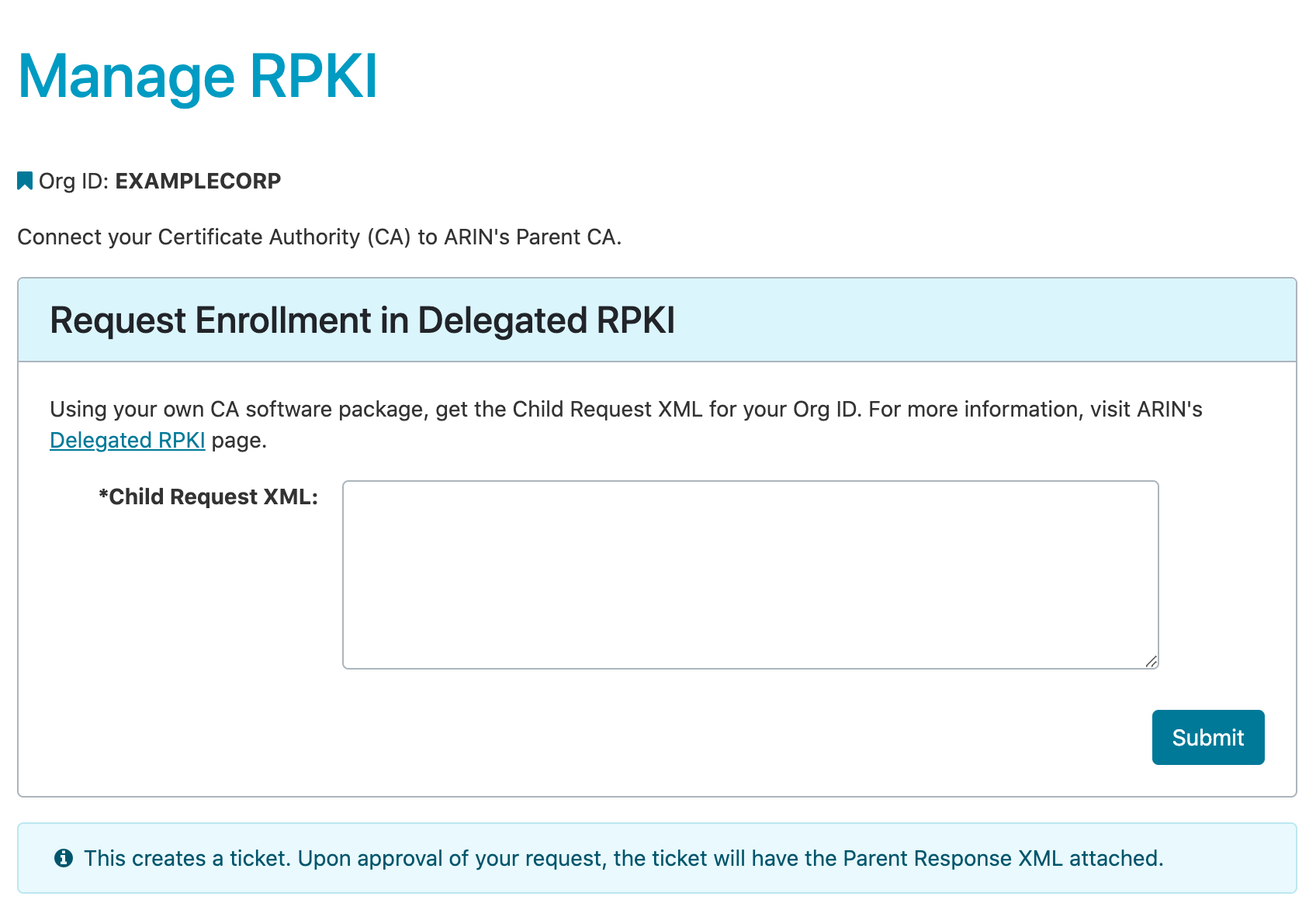
- After providing your Child Request, you will receive a message in ARIN Online with the Parent Response XML file as an attachment.
- Download this Parent Response XML file.
Upload the Parent Response XML File to Krill
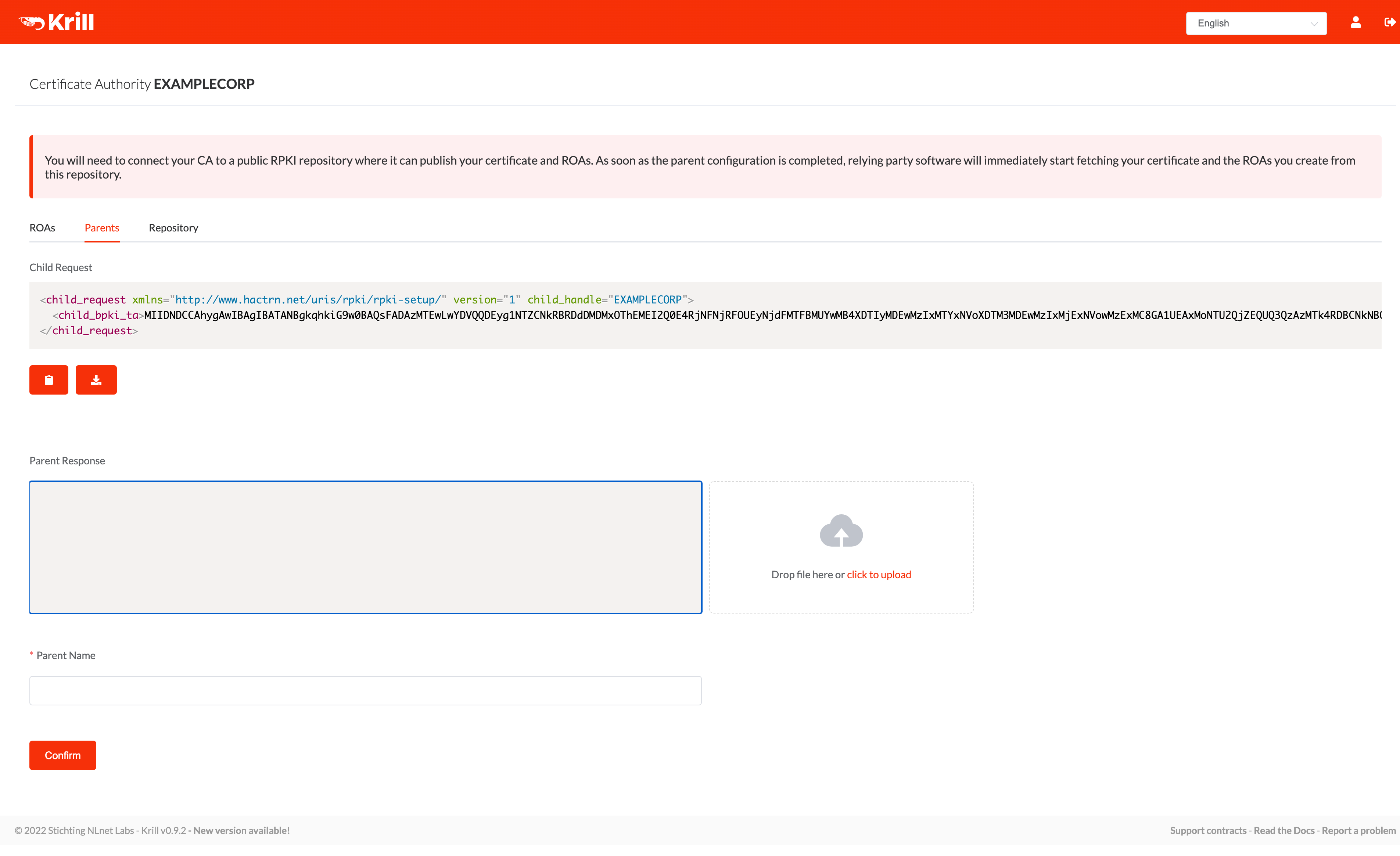
- Open Krill and choose the Parents tab.
- Drag and drop the Parent Response XML file you received from ARIN (or click to upload) or open the file to copy the XML and paste it in the appropriate section.
- Choose Confirm.
Configure a Publication Server
To ensure that your ROAs and certificate are published and available to other entities, publish your RPKI repository. Choose one of the following options:
Use the ARIN Repository Publication Service
If you choose not to run your own repository and publication server, you may select the option to user ARIN’s Repository Publication Service. For instructions, go to ARIN Repository Publication Service.
Run Your Own Publication Server
If you choose this option, you must ensure that your repository is highly available. You must also publish your own certificate revocation list. A certificate revocation list is a list of resource certificates that have been revoked and should not be relied upon. It is always issued by the CA which issues the corresponding certificates. Provide the location (known as a Production URI) of your server to ARIN in your child request XML file.
Configure ROAs
After you have received a delegated resource certificate from ARIN, you (or organizations under you whose resources you are certifying) will use a CA package such as Krill to create ROAs. ROAs are stored in the RPKI repository along with a certificate revocation list. The publication server (either yours or ARIN’s, if you are using the ARIN Repository Publication Service) will provide these objects to requesting entities.
Test Your RPKI Service
Test your RPKI service using the Operational Test and Evaluation (OT&E) environment. ARIN has created an RPKI instance within its OT&E environment for those wishing to experiment with RPKI without affecting production data. For more information, see the OT&E page.
Additional Information
For additional information on RPKI, including Delegated RPKI, visit the following resources:
- RPKI Documentation at https://rpki.readthedocs.io
- Krill - a free, open source RPKI daemon
- Internet Engineering Task Force (IETF) Requests for Comments (RFCs) relevant to Delegated RPKI:
- 3986: Uniform Resource Identifier (URI): Generic Syntax
- 5280: Internet X.509 Public Key Infrastructure Certificate and Certificate Revocation List (CRL) Profile
- 6481: A Profile for Resource Certificate Repository Structure
- 6486: Manifests for the Resource Public Key Infrastructure (RPKI)
- 6492: A Protocol for Provisioning Resource Certificates
- 8183: An Out-of-Band Setup Protocol for Resource Public Key Infrastructure (RPKI) Production Services
RPKI Deployment Options
- Hosted RPKI
- Delegated RPKI
- Repository Publication Service (RPS)
Registration Services Help Desk
7:00 AM to 7:00 PM ET
Phone: +1.703.227.0660
Fax: +1.703.997.8844